This website is a diverse collection of interesting ideas, thus it is panthematic. It contains free open-source software and projects (FOSS), computer science research results, blog articles and more, all created by myself, Timo Bingmann. Over the years, the amount of information, source code and other content has grown rather large. All entries are ordered chronologically in the weblog, with some special projects highlighted in the following summary:
Experimental implementations of many string sorting algorithms, including Parallel Super Scalar String Sample Sort (pS5) and Parallel Multiway LCP-Mergesort
This is a very much delayed blog entry stating that I join eBay's Search Engine team in San José, California.
eBay needs no introduction.It is one of the biggest e-commerce marketplaces in the world, connecting buyers and sellers from around the world. Depending on the metric and time frame, it is the fifth largest marketplace in the world by gross merchandise volume (GMV), behind Alibaba (Taobao and Tmall), Amazon, and JD.com. According to other statistics, it the second most visited global e-commerce and shopping website, again after Amazon.com (see Statista statistic). At the same time, its market cap is much smaller than that of those competitors, because it does not have inventory and only facilitates the transactions. It is an exciting company with lots of potential.
The search engine which powers eBay handles 80 billion queries on 3 billion documents every day. The index is distributed on tens of thousands geographically distributed servers. My job will be to improve the custom C++ search engine enabling customers to locate items to buy. There is an academic publication titled "The Architecture of eBay Search" presented at SIGIR eCom 2017 which contains more publicly available information about the search engine.
I am excited to have joined eBay's technical team in San José, California, USA.
Moving during the Covid-19 pandemic from Germany to California was challenge. But more about that in a future blog post.
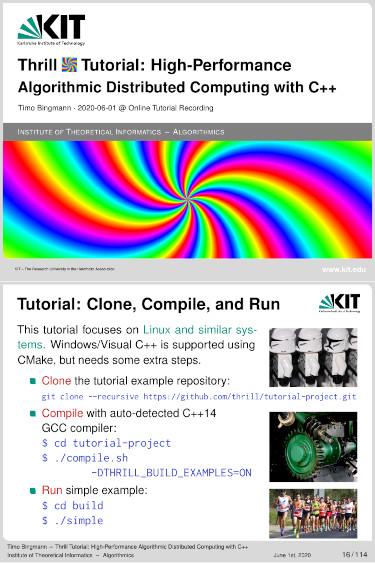
Thrill YouTube Tutorial: High-Performance Algorithmic Distributed Computing with C++
This post announces the completion of my new tutorial presentation and YouTube video: "Thrill Tutorial: High-Performance Algorithmic Distributed Computing with C++".
In this tutorial we present our new distributed Big Data processing framework called Thrill (https://project-thrill.org). It is a C++ framework consisting of a set of basic scalable algorithmic primitives like mapping, reducing, sorting, merging, joining, and additional MPI-like collectives. This set of primitives can be combined into larger more complex algorithms, such as WordCount, PageRank, and suffix sorting. Such compounded algorithms can then be run on very large inputs using a distributed computing cluster with external memory.
After introducing the audience to Thrill we guide participants through the initial steps of downloading and compiling the software package. The tutorial then continues to give an overview of the challenges of programming real distributed machines and models and frameworks for achieving this goal. With these foundations, Thrill's DIA programming model is introduced with an extensive listing of DIA operations and how to actually use them. The participants are then given a set of small example tasks to gain hands-on experience with DIAs.
After the hands-on session, the tutorial continues with more details on how to run Thrill programs on clusters and how to generate execution profiles. Then, deeper details of Thrill's internal software layers are discussed to advance the participants' mental model of how Thrill executes DIA operations. The final hands-on tutorial is designed as a concerted group effort to implement K-means clustering for 2D points.
The video on YouTube (https://youtu.be/UxW5YyETLXo) contains both presentation and live-coding sessions. It has a high information density and covers many topics.
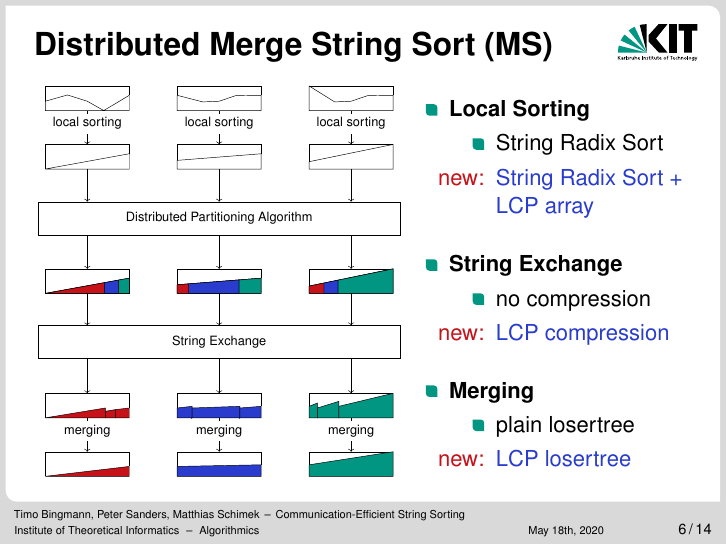
Due to the coronavirus this year's IPDPS conference is held in a virtual fashion, and we sadly missed a chance to visit New Orleans. Instead, I recorded a YouTube video of our conference talk, because the slides usually are illustrations requiring more explanation.
The paper "Communication-Efficient String Sorting", which I coauthored with Peter Sanders and Matthias Schimek, will still be published in the IEEE proceedings. A preprint of the full paper is available on arXiv:2001.08516 and also from this webpage:
The source code and more documentation about the implementations of our communication-efficient distributed string sorting algorithms can be found on my GitHub repositoryhttps://github.com/bingmann/distributed-string-sorting.
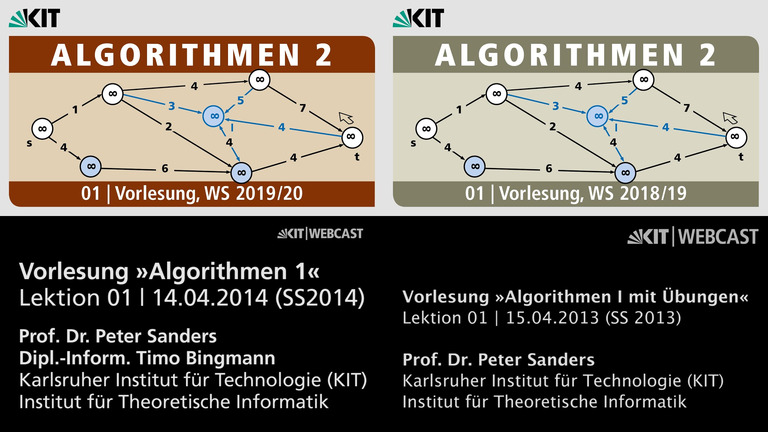
I have listed various entry time points for topics in the lectures for an easier overview. These entry points are only to those parts of the lectures or exercises which I personally presented. The lecture series are mainly presented by Prof Peter Sanders and exercises were jointly given with colleagues.
The main purpose of this article is that I can never seem to find the lectures on Youtube when I am looking for them. And I can now point people to this post if I want to reference some video explanation on a topic I previously gave.
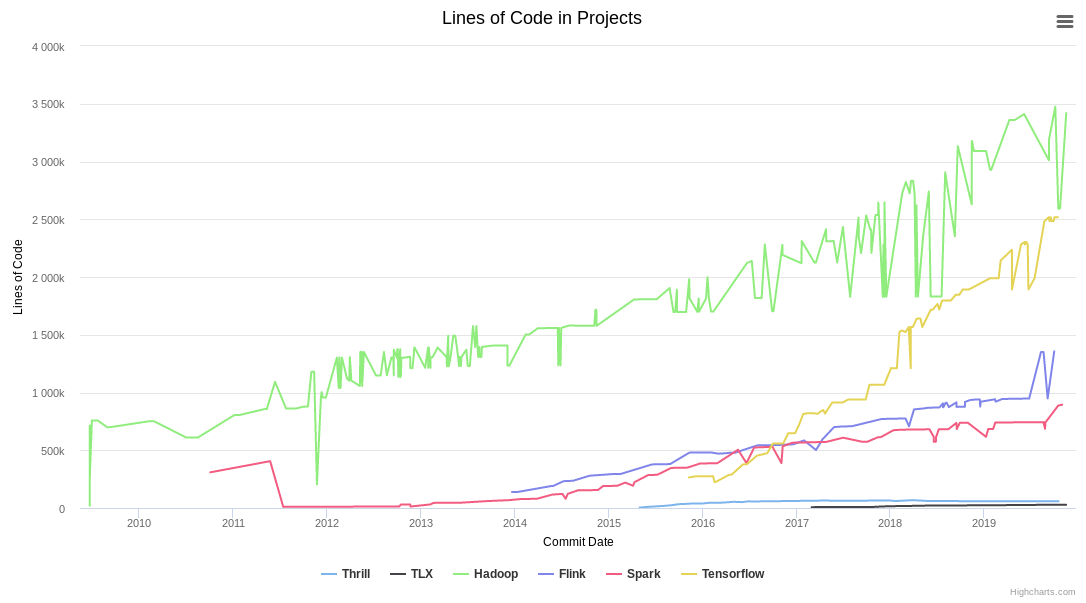
This article contains a chart of code line statistics over time extracted from a set of popular and less known git repositories. The git repositories are read with a script and each tag (release/version) is checked out and analyzed. If there are too few tags or versions (< 20), then for each beginning of a month the current commit is checked out analyzed. For each of these commit trees, the number of lines of code is determined with cloc (version 1.85).
Of course one can argue about whether lines of code is a useful metric at all. Depending on programming language and style the density of code will vary a lot. Furthermore, many projects over time have accidentally or purposefully included external library code (e.g. boost or similar packages) which greatly inflates their metric. And of course long source code may not actually accomplish much compared to a small algorithmic code. Nevertheless I believe the lines of code still somewhat valuable to compare the amount of developer time spent on the open-source projects.
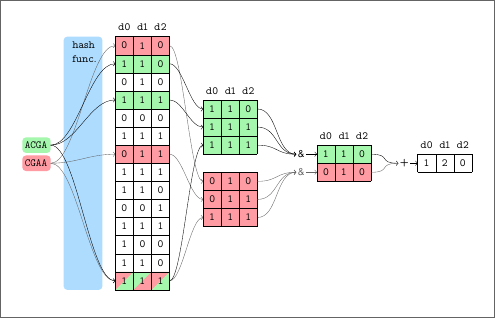
We present COBS, a COmpact Bit-sliced Signature index, which is a cross-over between an inverted index and Bloom filters. Our target application is to index k-mers of DNA samples or q-grams from text documents and process approximate pattern matching queries on the corpus with a user-chosen coverage threshold. Query results may contain a number of false positives which decreases exponentially with the query length. We compare COBS to seven other index software packages on 100000 microbial DNA samples. COBS' compact but simple data structure outperforms the other indexes in construction time and query performance with Mantis by Pandey et al. in second place. However, unlike Mantis and other previous work, COBS does not need the complete index in RAM and is thus designed to scale to larger document sets.
BlinkenSort with Sound - The Sound of LED Sorting Algorithms with Raspberry Pi 3 and APA102 or SK9822 LEDs
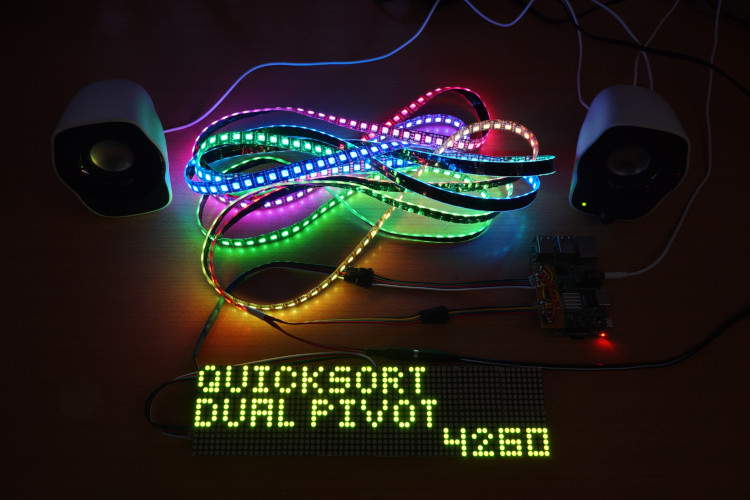
Once BlinkenSort successfully showed fascinatingly complex sorting algorithms on an LED strip using an ESP8266 (see other article), I naturally ventured to add the sound output from the Sound of Sorting program. This turned out much harder than initially thought, because the sound generation software required more processing power than available in the cheap standard microcontrollers. After much trail and error, I found out that a sufficiently new Raspberry Pi (I happened to have a Pi 3 model B) has the rare combination of enough compute power, can drive an LED strip directly via SPI, and has an audio line-out.
The Raspberry Pi, however, cannot drive the same type of LED strip reliably as the ESP8266 can, because the Raspberry Pi runs a time-shared Linux system instead of a real-time program. But it can drive the more expensive APA102 or SK9822 LEDs which have a separate clock line. These are 4-pin LED strips with clock and data, which can easily be attached to the Pi's SPI output pins. Furthermore, the APA102 LEDs can be driven at a much higher refresh rate than the WS2812B and SK6812, due to the extra clock signal. This ultimately makes the sorting animations even smoother than with the ESP8266 (where the frame rate is already unnoticeable). I could not find any off-the-shelf library to drive the APA102 with a C++ program on the Pi, but it was trivial to write a frame buffer class and access the /dev/spi0.0 devices directly.
Then there was the question of adding a display. And after more experimentation, I found the MAX7219 dot LED matrix modules work well. These can also be driven by SPI from the Pi, which actually has two SPI outputs on the models with 40 pins. And as a bonus these dot LED matrix models can pull off an amazing frame rate. That means that besides showing the algorithm name, the super-fast refresh rate enables displaying of (nearly) every comparison counter increment, despite the human viewer only being able to see around 25 changes per second. Simply adding a HDMI display to the Pi would have also worked, but the LED matrix is cooler and has a retro feeling to it.
As you can see in the following YouTube video, each algorithm does something quite different which makes this a very interesting art installation with deep connections to informatics. BlinkenSort currently contains the following eighteen sorting algorithms (listed in the same order as in the video): MergeSort, Insertion Sort, QuickSort (LR) Hoare, QuickSort (LL) Lomoto, QuickSort Dual Pivot, ShellSort, HeapSort, CycleSort, RadixSort-MSD (High First), RadixSort-LSD (Low First), std::sort, std::stable_sort, WikiSort, TimSort, Selection Sort, Bubble Sort, Cocktail-Shaker Sort, and BozoSort. Besides sorting algorithms the collection also contains four hash table implementations: Linear Probing Hash Table, Quadratic Probing Hash Table, Cuckoo-Hashing with two places, and Cuckoo-Hashing with three places.
About two years ago I first got my hands on one of the fancy addressable "Neopixel" LED strips, which can be programmed to show colorful animations. I quickly saw there was one project I just had to do with these strips: use them to display sorting algorithms as animations. Since my Sound of Sorting project already contained the source code for many algorithms, the step to using an addressable LED strip as a "display" was not a large one. The strips can be animated using microcontrollers such as the Arduino or Espressif ESP chips, which have way enough compute power for running sorting algorithms on a few hundred items. Since all sorting algorithms run on random input data and may make random decisions themselves, the shown animations are near infinitely varying and fascinatingly complex.
The outcome of my project of displaying sorting algorithms on LED strips are two pieces of art:

"BlinkenSort", which are sorting algorithms animated on SK6812 RGBW LEDs using an ESP8266 microcontroller, is described in this article.
For both projects I created a YouTube video and provide a construction manual on this website if you are interested in the internals or want to build something similar.
Today was the ceremonial graduation day on which new bachelors, masters, and also Dr.s (PhDs in the Anglo-Saxon world) were celebrated who received their degrees from the department of informatics at the Karlsruhe Institute of Technology (KIT) within the last year. This year's graduation day coincided with the 50th anniversary of the introduction of computer science as a field of study and as a diploma degree.
I was among those honoured for completing the Dr. last year, (see my dissertation page). In total 44 freshly minted Dr.s, 292 masters, and 261 bachelors where celebrated today.
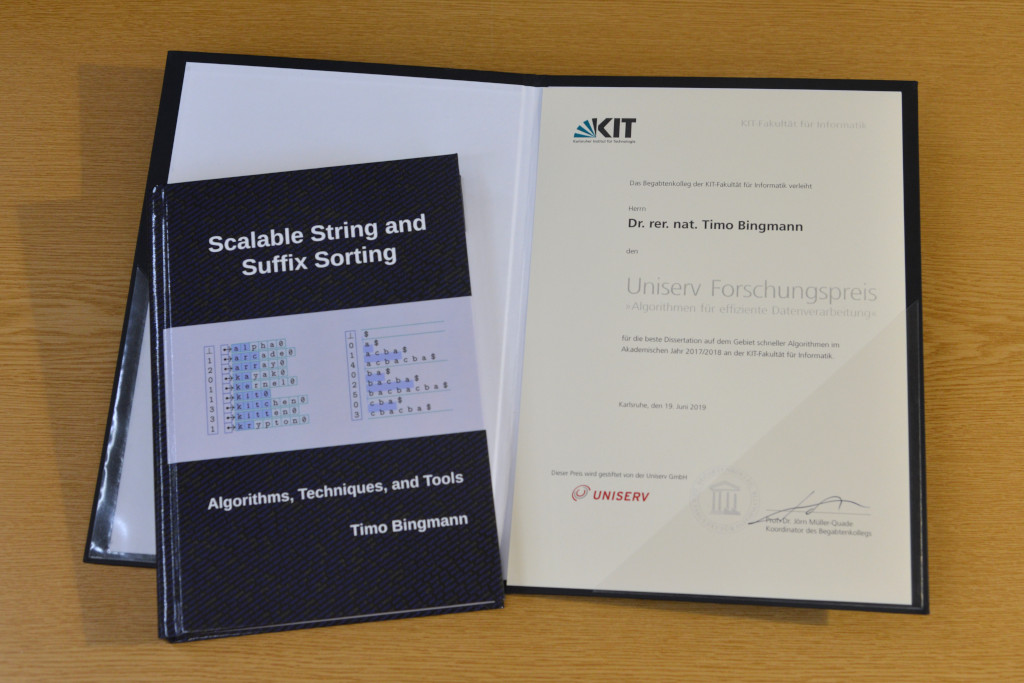
Furthermore, I was awarded the Uniserv Research-Prize "Algorithms for Efficient Data-Processing" for the best dissertation in the field of fast algorithms in the academic year 2017/2018 at the KIT department of informatics by the talent committee of the department.
I would like to thank Uniserv for endowing the department and my dissertation with this prize and especially the talent committee for selecting my work. It was a great and pleasant surprise to receive such a notification in the morning email inbox, which as usual contained many "prize and distant inheritance" emails. But on that day one of them was real, and I nearly overlooked it.
My dissertation was the central purpose in my life for many years, and receiving the prize helps me feel the time was well spent and consider it as confirmation of having furthered the field of informatics a tiny bit. It is rare to receive such honours and I am truly grateful.
Today I published the first animation of market data by my new charting tool on Youtube. In light of recent events this was an video of inversions of the US Treasury Yield Curve. The video is created with QCustomPlot and a large Qt program to process data.
The dancing green line plots the yields of all constant maturity treasury notes. The trailing blue line shows the efficient 30 day Federal Funds rate. The orange line is the broad stock market SPX index. The background of each day is painted red if an inversion of the 1y/5y, 1y/10y, or 2y/10y yields occurs. The darker the red color, the greater the inversion.
Watch the yield curve and the stock market index change over the decades, notice their behaviour in times of crisis. The video ends with the current inversion around April 2019. More about the yield curve and inversions: https://en.wikipedia.org/wiki/Yield_curve#Inverted_yield_curve
The Federal Funds rate data was taken from FRED (Federal Reserve Bank of St. Louis), series DFF: https://fred.stlouisfed.org/series/DFF. The US Treasury yields data was also taken from FRED, series DGS1MO, DGS3MO, DGS1, DGS2, DGS5, DGS7, DGS10, DGS20, DGS30, e.g. https://fred.stlouisfed.org/series/DGS30. Across the decades the various durations were sometimes not emitted, which is visible by points being added or removed from the green curve. SPX data was taken from Stooq.com, series ^SPX.